
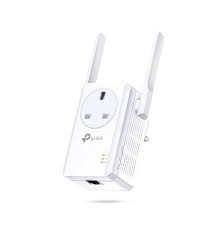
When your home or office modem-router can’t provide a stable wireless Internet connection in all areas, it’s time to consider using a range extender or repeater. In this article, we’ll take a closer look at the TP-LINK TL-WA860RE range extender and explore its features, benefits, and how it can improve your Wi-Fi experience.
What is a Range Extender?
A range extender is a device that repeats wireless signals from your modem-router to extend coverage in areas where the signal is weak or non-existent. Unlike traditional repeaters that use cables to connect devices, range extenders work wirelessly to provide a stronger and more reliable connection.
Range extenders are particularly useful for several reasons:
- Improved Coverage: They can cover larger areas than most home routers, ensuring that you have a strong signal throughout your home or office.
- Reduced Dead Spots: By amplifying the wireless signal, range extenders eliminate dead spots where your Internet connection is slow or non-existent.
- Easy Setup: Most range extenders come with easy-to-use interfaces and setup options, making it simple to get started.
- Cost-Effective: They can be a cost-effective solution compared to installing new Wi-Fi access points or upgrading your router.
Design and Placement
One of the key features of the TL-WA860RE is its simple design, making it easy to place in any room without drawing attention away from your decor. The device is compact and discreet, allowing you to position it anywhere, leaving free space for other devices. This makes it perfect for use in small homes or offices where space is limited.
When placing the TL-WA860RE, consider the following:
- Height: Place the range extender at a height of around 3-4 feet off the ground to ensure optimal wireless signal strength.
- Distance: Keep the range extender away from walls and other obstacles to maintain a clear line of sight for your Wi-Fi signal.
- Interference: Avoid placing the range extender near sources of interference, such as cordless phones or microwaves.
LAN Port: Extending Coverage to More Devices
The TL-WA860RE comes with a LAN port that enables you to connect devices such as smart TVs, set-top boxes, and amplifiers without the need for cables. This feature is particularly useful when you have multiple devices that require Internet access but don’t support Wi-Fi connectivity.
To use the LAN port, follow these steps:
- Connect your device to the range extender using an Ethernet cable.
- Set up your device’s Internet connection by following the manufacturer’s instructions.
- Configure the range extender to assign an IP address and subnet mask to your device.
Stable, Fast, and Rugged Coverage
The TL-WA860RE excels at its primary function: providing stable, fast, and reliable coverage in every corner of your home or office. Whether your wireless network uses the b/g/n standard or is cabled via Ethernet, this range extender ensures that you get a strong and consistent connection.
To ensure optimal performance, follow these tips:
- Update Your Firmware: Regularly check for firmware updates to ensure you have the latest features and bug fixes.
- Use Quality Wi-Fi Antennas: Use high-quality Wi-Fi antennas on your router and range extender to improve signal strength and coverage.
- Avoid Overcrowding: Keep your network devices at a reasonable distance from each other to prevent interference.
Signal Strength Indicators
The TL-WA860RE features built-in signal strength indicators that help you pinpoint areas where the Wi-Fi signal is weak. This feature allows you to position the device strategically to ensure maximum coverage and prevent dead spots.
To view signal strength indicators on your range extender:
- Open the range extender’s web interface using a web browser.
- Navigate to the “Status” or “Monitor” section.
- Look for the “Signal Strength” indicator, which should display the signal strength in decibels (dB).
Intuitive Controls and WPS for Easy Setup
The range extender comes with intuitive controls that make it easy to set up and use. The addition of a push-button WPS (Wi-Fi Protected Setup) button makes it simple to associate your device with your modem-router, reducing setup time and hassle.
To set up your TL-WA860RE using the WPS method:
- Press and hold the WPS button on your range extender for 2 seconds.
- Press and hold the WPS button on your modem-router for 10 seconds.
- Follow the on-screen instructions to complete the setup process.
Portable Profiles: Convenient for Travel or On-the-Go Use
The TL-WA860RE includes a profile management feature that allows you to save and switch between different network profiles. This means you can easily transport the range extender with its associated settings, ensuring seamless connectivity when you arrive at your destination.
To create a portable profile:
- Open the range extender’s web interface using a web browser.
- Navigate to the “Settings” or “Advanced” section.
- Create a new profile by clicking on the “Create New Profile” button.
- Configure the profile settings as desired, including the network name, password, and channel.
Conclusion: Is TL-WA860RE Right for You?
If you’re looking for an affordable and reliable solution to enhance your home or office Wi-Fi coverage, look no further than the TP-LINK TL-WA860RE range extender. With its simple design, intuitive controls, and robust features, this device is perfect for anyone seeking a hassle-free Internet experience.
Frequently Asked Questions
- What is the TL-WA860RE’s range?
The TL-WA860RE can cover an area of up to 1500 square feet (140 sq meters) with a strong and reliable Wi-Fi signal. - How does the TL-WA860RE work?
The TL-WA860RE works by repeating wireless signals from your modem-router to extend coverage in areas where the signal is weak or non-existent. - What types of devices can I connect using the LAN port?
You can connect a variety of devices such as smart TVs, set-top boxes, and amplifiers using the LAN port on the TL-WA860RE. - Is the TL-WA860RE suitable for wired Ethernet connections?
Yes, the TL-WA860RE supports both wireless and wired Ethernet connections, ensuring you get a strong and consistent connection. - How do I reset the TL-WA860RE to its default settings?
To reset the TL-WA860RE to its default settings, press and hold the power button for 10 seconds until the device restarts. -
Can I use multiple range extenders with the same network profile?
Yes, you can use multiple range extenders with the same network profile, allowing you to seamlessly switch between different areas of your home or office. -
Is the TL-WA860RE compatible with my modem-router?
To ensure compatibility, check that your modem-router supports 2.4 GHz and 5 GHz Wi-Fi standards, which are supported by the TL-WA860RE. - Can I purchase additional range extenders to expand coverage further?
Yes, you can purchase additional range extenders from TP-LINK or authorized retailers to expand coverage even further. -
What is the warranty period for the TL-WA860RE?
The TL-WA860RE comes with a 1-year limited warranty that covers manufacturing defects and repairs. -
Can I upgrade my TL-WA860RE firmware in the future?
Yes, you can upgrade your TL-WA860RE firmware to ensure you receive the latest features and bug fixes.


