
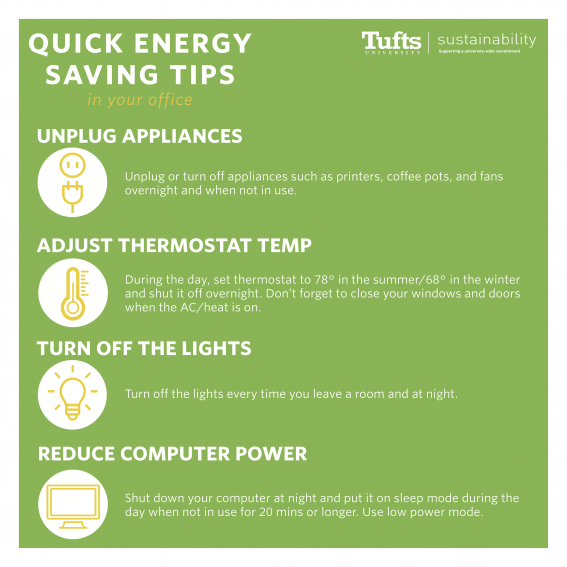
As a savvy business owner, you’re likely aware of the importance of reducing energy consumption in your organization. According to a research by Ovum in January 2012, every desktop computer can save up to $30 per year, equivalent to 380 kWh and 265 kg of CO2 emissions annually. This may seem like a small amount, but considering the rising cost of electricity, this savings can add up quickly.
However, achieving significant energy savings requires a multi-faceted approach. In this article, we’ll explore two key areas: good energy behavior habits (also known as “policy of on and off” etc.) and desktop power management.
Why Desktop Power Management Matters
Desktop power management refers to the process of managing computer components and operating systems throughout their lifecycle. This aspect is often overlooked by organizations, with 56% of companies neglecting it, according to Dimensional Research. By implementing a well-structured desktop power management strategy, large enterprises can reap significant benefits.
The Benefits of Desktop Power Management
So, why should you care about desktop power management? The answer lies in the potential for substantial energy savings and cost reductions. In fact, research suggests that proper desktop power management can save organizations more than what they would achieve through mere “energy-saving tips” or “best practices.”
By optimizing computer components and systems, desktop power management can lead to significant improvements in energy efficiency, reducing peak demand on the grid and minimizing environmental impact. Additionally, a well-implemented desktop power management strategy can result in cost savings for organizations, as reduced energy consumption translates into lower utility bills.
Windows XP End-of-Life: A Catalyst for Change
One event that can serve as a catalyst for change is the end of Microsoft’s support for Windows XP on April 8, 2014. With approximately 40% of personal computers still running Windows XP (as revealed by Net Applications in February 2013), this deadline creates an opportunity for organizations to migrate and optimize their desktops with a more efficient power management strategy.
A Strategic Approach to Desktop Migration
The need to upgrade from Windows XP forces companies to reassess their approach to desktop management. This involves implementing large-scale projects that require careful planning to minimize disruptions to daily operations. However, this transition also presents an opportunity to improve energy efficiency and control desktop consumption.
To ensure a smooth migration process, organizations should consider the following steps:
- Assess current desktop infrastructure and identify areas for improvement.
- Develop a clear strategy for managing computer components and systems.
- Engage with IT staff to ensure a seamless transition.
- Communicate the benefits of desktop power management to stakeholders.
Leveraging Desktop Power Management for Real Savings
While good energy behavior habits are essential, desktop power management offers a more substantial potential for savings. By optimizing computer components and systems, organizations can achieve real reductions in energy consumption. In fact, research suggests that proper desktop power management can yield savings that far surpass the benefits of mere “energy-saving tips” or “best practices.”
Key Considerations for Implementing Desktop Power Management
Before embarking on a desktop power management initiative, consider the following:
- Assess your current desktop infrastructure and identify areas for improvement.
- Develop a clear strategy for managing computer components and systems.
- Engage with IT staff to ensure a smooth migration process.
- Communicate the benefits of desktop power management to stakeholders.
Best Practices for Desktop Power Management
To get the most out of desktop power management, consider the following best practices:
- Implement a power-saving policy that balances user experience with energy efficiency.
- Regularly monitor and analyze energy consumption data.
- Use automation tools to optimize computer shutdowns and startup times.
- Educate users on how to properly shut down their computers.
Automating Desktop Power Management
One effective way to implement desktop power management is by automating tasks such as computer shutdown, startup time optimization, and monitoring energy consumption. Automation can help reduce manual errors, minimize downtime, and ensure that all aspects of the desktop infrastructure are optimized for energy efficiency.
Monitoring Energy Consumption
Regular monitoring and analysis of energy consumption data is essential for identifying areas where desktop power management efforts can be improved. By tracking energy usage patterns, organizations can identify trends and pinpoint opportunities to optimize their desktop infrastructure.
The Role of Smart Devices in Desktop Power Management
Smart devices such as sensors and smart power strips can play a significant role in optimizing desktop power management. These devices can monitor energy consumption in real-time, detect anomalies, and trigger automated responses to optimize energy efficiency.
Case Study: XYZ Corporation
XYZ Corporation is a large enterprise that provides software solutions for the financial industry. In 2015, the company embarked on a comprehensive desktop power management initiative aimed at reducing energy consumption and lowering utility bills.
The project involved:
- Assessing current desktop infrastructure and identifying areas for improvement.
- Developing a clear strategy for managing computer components and systems.
- Implementing automation tools to optimize computer shutdowns and startup times.
- Educating users on how to properly shut down their computers.
As a result of the initiative, XYZ Corporation was able to reduce its energy consumption by 15%, resulting in significant cost savings.
Conclusion
By adopting a comprehensive desktop power management strategy, organizations can reap significant benefits in terms of energy savings and cost reductions. Windows XP’s end-of-life presents an opportunity for companies to migrate to more efficient systems and optimize their desktops for better performance.
In conclusion, don’t overlook the potential of desktop power management. By investing time and resources into this aspect of your organization’s infrastructure, you can achieve substantial savings and improve overall energy efficiency.
FAQs
- What is desktop power management?
Desktop power management refers to the process of managing computer components and systems throughout their lifecycle to optimize energy consumption. - Why is desktop power management important?
Desktop power management is crucial for achieving significant energy savings and cost reductions in organizations. - How can I get started with desktop power management?
Begin by assessing your current desktop infrastructure, developing a clear strategy, and engaging IT staff to ensure a smooth migration process. - What are some best practices for implementing desktop power management?
Regularly monitor and analyze energy consumption data, implement a power-saving policy that balances user experience with energy efficiency, and use automation tools to optimize computer shutdowns and startup times. - How can I measure the effectiveness of my desktop power management strategy?
Monitor and analyze energy consumption data to assess the impact of your efforts on energy savings and cost reductions. - What role does Windows XP’s end-of-life play in implementing desktop power management?
The end-of-life for Windows XP presents an opportunity for organizations to migrate to more efficient systems and optimize their desktops for better performance. - Can I achieve significant energy savings through “energy-saving tips” or “best practices”?
While good energy behavior habits are essential, desktop power management offers a more substantial potential for savings due to its focus on optimizing computer components and systems. - How can I communicate the benefits of desktop power management to stakeholders?
Educate users on how to properly shut down their computers, emphasize the importance of energy efficiency, and highlight the cost savings associated with implementing a well-structured desktop power management strategy.
Additional Resources
- Ovum Research: “Desktop Power Management” (2012)
- Dimensional Research: “The State of Desktop Power Management” (2015)
- Microsoft Support: “Windows XP End-of-Life”


