
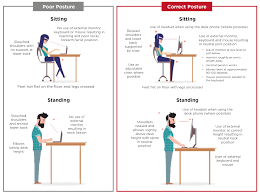
As an office worker, spending most of your day sitting in front of a computer can put you at risk of developing back pain or other musculoskeletal issues. However, with a few simple adjustments and habits, you can reduce the likelihood of these problems.
In this article, we will explore how to maintain good posture while working on your computer, discuss the importance of ergonomic seating, and provide exercises to help prevent muscle strain.
Understanding Posture at Your Computer
When sitting in front of a computer, it’s essential to remember that you shouldn’t be bending or leaning forward. Instead, think of your body as an instrument, using the chair and desk as tools to support you, not restrict you. Keep your center of gravity within your body, with your feet firmly planted on the ground.
The Importance of Ergonomic Seating
Your office chair is a crucial factor in maintaining good posture while working at your computer. The height and shape of the chair can significantly impact your comfort and overall well-being. When choosing an ergonomic chair, consider the following:
- Seat Height: Ensure that the seat is at a comfortable height, allowing you to place your feet flat on the floor or on a footrest.
- Back Support: A contoured backrest will help maintain the natural curve of your spine.
- Armrests: Adjustable armrests can provide support for your shoulders and wrists.
Ergonomic Desk Setup
A well-set up desk is essential to maintaining good posture while working at your computer. Here are some tips to consider:
- Monitor Placement: Place your monitor directly in front of you, at a distance of about 20-25 inches. The top of the screen should be at eye level or slightly below.
- Keyboard Positioning: Position your keyboard directly in front of your body, with your wrists straight and your elbows at a 90-degree angle.
- Mouse Placement: Place your mouse close to your body and at the same height as your keyboard.
Exercises to Prevent Muscle Strain
When working at your computer for extended periods, it’s essential to take breaks to stretch and move around. Here are some exercises you can do while seated or standing:
- Neck Stretch: Slowly tilt your head to the right, bringing your ear towards your shoulder. Hold for 10 seconds and then return to the starting position. Repeat on the left side.
- Shoulder Rolls: Roll your shoulders forward and backward in a circular motion. Repeat for 10 repetitions.
- Wrist Extensions: Hold your arms straight out in front of you and lift your hands up, stretching your wrists. Hold for 5 seconds and then lower back down.
Additional Tips for Maintaining Good Posture
- Take regular breaks to stand up, stretch, and move around.
- Avoid crossing your legs or ankles, which can cause discomfort and strain on your muscles.
- Keep your monitor at a comfortable distance and height, ensuring that the top of the screen is at eye level.
Frequently Asked Questions
Q: How often should I take breaks when working at my computer?
A: It’s recommended to take a 10-15 minute break every hour to stretch and move around.
Q: What exercises can I do to improve my posture while sitting at my computer?
A: Try shoulder rolls, neck stretches, and wrist extensions to loosen up tight muscles and maintain good posture.
Q: Can I still get back pain if I follow these tips?
A: While following these tips can significantly reduce the risk of back pain, it’s impossible to completely eliminate the risk. However, by maintaining good posture and taking regular breaks, you can minimize your chances of developing musculoskeletal issues.
Q: What are some common mistakes people make when working at their computer that can lead to back pain?
A: Common mistakes include leaning forward while typing, not taking breaks, and wearing uncomfortable clothing or sitting in a poorly adjusted chair.
Q: Can I use my laptop instead of a desktop computer for better posture?
A: While using a laptop can be more portable, it’s often less comfortable than using a desktop computer. However, if you must use your laptop, consider investing in an external keyboard and mouse to improve your typing experience.
Q: Are there any specific exercises that can help alleviate back pain caused by prolonged sitting?
A: Yes, exercises like pelvic tilts, leg swings, and torso twists can help loosen up tight muscles and reduce discomfort.
Q: Can I get professional advice on maintaining good posture while working at my computer?
A: Absolutely. Consider consulting with an ergonomics specialist or a healthcare professional for personalized advice on maintaining good posture and reducing the risk of musculoskeletal issues.
Conclusion
Maintaining good posture while working at your computer is crucial to preventing back pain and other musculoskeletal issues. By following these tips, incorporating exercises into your daily routine, and taking regular breaks, you can significantly reduce the risk of developing musculoskeletal problems.


