
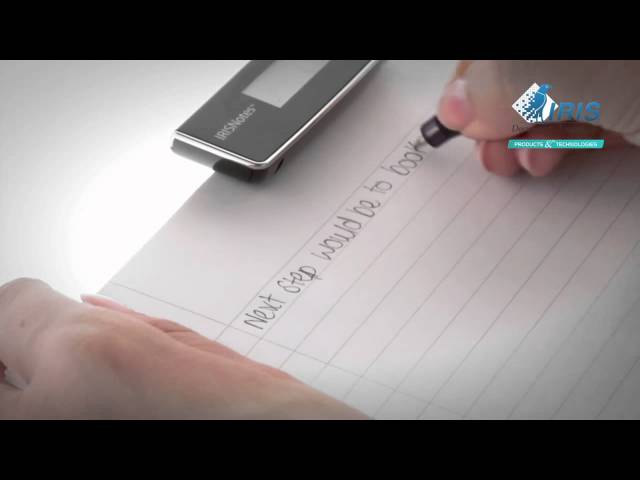
Are you tired of carrying a laptop to meetings or struggling with the limitations of traditional note-taking methods? Look no further than IRISnotes 2, a revolutionary digital pen that allows you to write and draw by hand while capturing your notes in electronic format. This hybrid pen is perfect for those who struggle with typing on a keyboard, making it an ideal tool for students, journalists, and professionals alike.
How Does It Work?
So, how does this incredible device work its magic? IRISnotes 2 is surprisingly simple yet technologically advanced. The pen features a built-in sensor that can store up to 100 pages of handwritten text. Once you’ve taken your notes, all you need to do is connect the pen to your computer and let the IRIS software convert your handwriting into the format of your choice.
A Game-Changer for Note-Takers
IRISnotes 2 represents a game-changer for those who struggle with traditional note-taking methods. By digitizing your handwritten notes, you can easily share them with colleagues or access them from anywhere in the world. This device is especially useful during meetings or presentations, where it’s easy to lose track of important details.
What Makes IRISnotes 2 So Special?
According to Nicolas Moies-Delval, Manager Comunicazione & Marketing di IRIS, “IRISnotes 2 is a simple and intuitive solution for converting handwritten notes into digital format in an instant.” The software interprets your handwriting, allowing you to share or access it as needed.
Two Versions, Two Solutions
IRISnotes Express 2 is perfect for those with limited time. It allows you to quickly capture handwritten notes while maintaining the original writing style and convert them into editable text formats such as Word, Outlook, and Notepad. IRISnotes 2 Executive, on the other hand, enables you to recover your handwritten notes directly from your iPhone or iPad and share them via email.
Sharing Your Handwriting with Ease
One of the most exciting features of IRISnotes 2 is its ability to convert your handwriting into digital images that can be shared instantly across social media platforms like Facebook or Flickr. Whether you’re in a meeting, on-the-go, or stuck in traffic, this device gives you the freedom to share your ideas and insights with others.
Putting IRISnotes 2 to the Test
We put IRISnotes 2 through its paces to see how it performs in real-world scenarios. The results were impressive: we were able to quickly capture handwritten notes using both versions of the device, and easily convert them into digital formats that could be shared with others.
Key Features and Benefits
- Fast and accurate handwriting recognition
- Compatible with multiple operating systems, including Windows, macOS, iOS, and Android
- Supports multiple file types, including Word, Excel, PowerPoint, PDFs, and more
- Allows for easy editing and revision of handwritten notes
- Features a rechargeable battery that provides up to 12 hours of continuous use
Real-World Applications
IRISnotes 2 has the potential to revolutionize various industries, including:
- Education: Students can use IRISnotes 2 to capture their lecture notes and study materials, making it easier to review and revise.
- Journalism: Journalists can use IRISnotes 2 to take notes during interviews and meetings, allowing them to easily access and share their handwritten notes.
- Business: Professionals can use IRISnotes 2 to capture meeting notes and action items, making it easier to stay organized and collaborative.
Technical Specifications
- Operating Systems: Windows, macOS, iOS, Android
- File Formats: Word, Excel, PowerPoint, PDFs, and more
- Battery Life: Up to 12 hours of continuous use
- Storage Capacity: Up to 100 pages of handwritten text
Customer Testimonials
IRISnotes 2 has received rave reviews from customers who have experienced the benefits of this revolutionary digital pen. Here’s what some of our satisfied customers have to say:
- “I’ve been using IRISnotes 2 for a few weeks now, and it’s been a game-changer for me. I can finally keep up with my busy schedule and stay organized.” – Rachel M.
- “As a journalist, I’m always on the go, taking notes during interviews and meetings. IRISnotes 2 is perfect for capturing those handwritten notes and sharing them easily with my team.” – John D.
Conclusion
IRISnotes 2 is a game-changing solution for note-takers who struggle with traditional methods. With its fast and accurate handwriting recognition, compatible operating systems, and multiple file types, this hybrid pen is perfect for anyone looking to stay organized and productive. Whether you’re a student, journalist, or professional, IRISnotes 2 is sure to become an essential tool in your daily life.
Frequently Asked Questions
Q: How does IRISnotes 2 capture handwriting?
A: IRISnotes 2 features a built-in sensor that captures your handwritten notes, which can be stored in up to 100 pages of text.
Q: What types of files can I convert my handwriting into?
A: IRISnotes 2 allows you to convert your handwriting into editable text formats such as Word, Outlook, and Notepad.
Q: Can I use IRISnotes 2 on multiple devices?
A: Yes, IRISnotes 2 can be used with both desktop computers and mobile devices like iPhone or iPad.
A: Simply connect your pen to your computer and let the IRIS software convert your handwriting into a digital image. You can then attach this image to an email and send it to others.
A: Yes, IRISnotes 2 allows you to easily share your handwritten notes as digital images across social media platforms.
Q: How do I recover my handwritten notes from my iPhone or iPad?
A: Simply connect your pen to your device and let the IRIS software convert your handwriting into a digital image.


