
As a mobile device user, you’re likely no stranger to the frustration of a dead battery. Whether you have an iPhone 7 or an iPhone 7s, it’s essential to know how to maximize your device’s battery life. In this article, we’ll explore practical tips and tricks to help you extend the lifespan of your iPhone’s battery.
Understanding Your iPhone’s Battery Life
Before we dive into the tips, let’s understand why your iPhone’s battery might be draining quickly. There are several factors that can contribute to a short battery life, including:
- Screen brightness: A brighter screen consumes more power.
- App usage: Certain apps can drain the battery faster than others.
- Location services: GPS and geo-location can consume significant amounts of power.
- Network connectivity: 4G and Wi-Fi can also contribute to battery drainage.
Tips for Optimizing Your iPhone’s Battery Life
Here are some essential tips to help you extend your iPhone’s battery life:
Battery-Saving Tips
- Limit screen brightness: Adjust the screen brightness to a comfortable level. This will not only conserve battery life but also reduce eye strain.
- Turn off Location Services: Disable Location Services for apps that don’t require them. This can help reduce power consumption, especially if you’re using your iPhone in areas with weak signal strength.
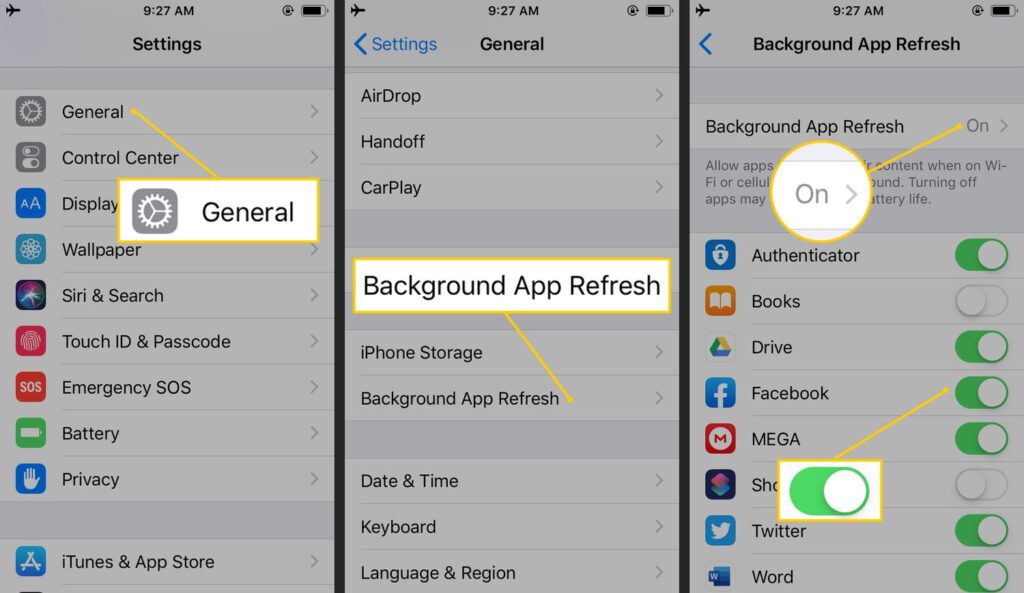
- Close unused apps: Close any unnecessary apps running in the background. This will free up system resources and prevent battery drain.
- Disable Bluetooth and Wi-Fi: Turn off these features when not in use. While it may be inconvenient, turning off Bluetooth and Wi-Fi can help prolong your iPhone’s battery life.
- Use Airplane Mode: Enable Airplane Mode to reduce power consumption.
Battery-Hardening Tips
- Charge your iPhone correctly: Avoid overcharging or undercharging your battery. This is especially important for newer iPhones, which are designed to optimize their batteries’ lifespan. Most modern devices should charge between 20% and 80%.
- Update your operating system: Regular updates often include battery life improvements.
- Reset your iPhone: Perform a hard reset every few months to maintain your iPhone’s performance.
Additional Solutions
- Use a power bank: Invest in a high-capacity power bank to extend your iPhone’s battery life on the go. A good power bank can charge your iPhone multiple times, ensuring you stay connected even when you’re away from a wall outlet.
- Replace your battery: If your iPhone’s battery is no longer holding a charge, consider replacing it with an official Apple replacement or a third-party alternative. This may be a more expensive solution, but it will ensure that your device runs smoothly and efficiently.
Additional Battery-Saving Tips for Specific Apps
- YouTube and video streaming apps: These apps often consume high amounts of power due to the constant buffering and playback.
- Gaming apps: Many games require significant system resources, which can lead to battery drain.
- Email and messaging apps: These apps can also consume more power than you think.
Battery-Saving Tips for iPhone Models
Different iPhone models have varying levels of battery life. Here are some specific tips tailored to different models:
- iPhone 7 and 7s: These devices have a smaller battery, making it essential to optimize your usage habits.
- iPhone X and later models: These devices have larger batteries, but they also require more power due to advanced features like facial recognition.
Tips for iPhone Users with Power-Consuming Jobs
If you work on the go or use your iPhone as a laptop replacement, here are some additional tips to help you conserve battery life:
- Use a keyboard case: Invest in a keyboard case that also provides a power bank.
- Turn off unnecessary features: Disable features like email notifications and video playback when not in use.
- Adjust your screen brightness: Lower the screen brightness or use auto-brightness to save power.
Conclusion
Optimizing your iPhone’s battery life is easier than you think. By implementing these practical tips and tricks, you can extend the lifespan of your device and enjoy a more seamless mobile experience. Remember to always charge your iPhone correctly, update your operating system regularly, and consider replacing your battery if it no longer holds a charge.


