
As the world becomes increasingly digital, remote work interviews have become the norm. Gone are the days of in-person meetings; now, you can conduct your interview from the comfort of your own home (or anywhere else with an internet connection). But, how do you prepare for this new reality?
Why Remote Work Interviews Matter
Unlike traditional face-to-face interviews, remote work interviews require a different approach. The absence of nonverbal cues and visual distractions means that it’s essential to focus on building rapport and establishing trust with the interviewer. It’s not just about being prepared; it’s about creating an impression that will make you stand out from the competition.
In today’s digital age, remote work interviews are no longer a novelty but a necessity for many businesses. With the rise of virtual teams and global talent pools, companies need to adapt their interview processes to accommodate a wider range of candidates. Remote work interviews offer numerous benefits, including increased accessibility, cost savings, and improved work-life balance.
However, conducting a remote interview requires more than just technical proficiency. It demands attention to detail, effective communication skills, and the ability to build rapport with an interviewer from a distance. In this article, we’ll explore the essential tips and tricks for preparing for a remote work interview and making a positive impression on your interviewer.
Hardware Essentials for a Successful Remote Interview
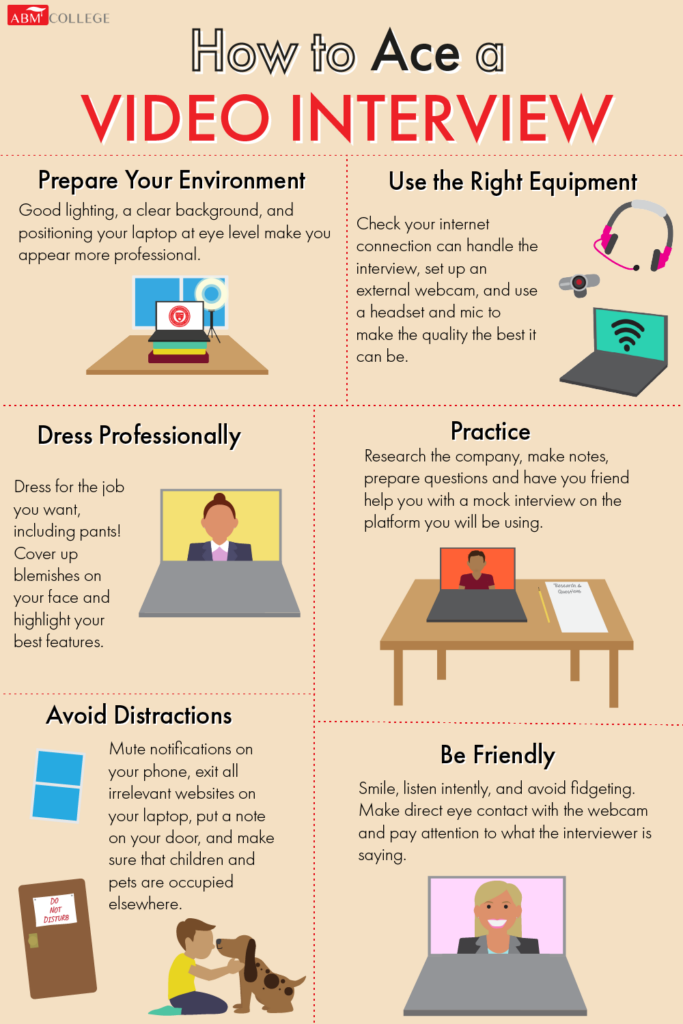
Before we dive into the nitty-gritty of remote interview preparation, let’s talk about the hardware you’ll need to succeed. A good webcam is crucial for maintaining eye contact and building trust with your interviewer. Make sure it’s properly positioned and adjusted to ensure that your face is clearly visible.
Next up, invest in a pair of high-quality headphones or earbuds instead of a speakerphone. This will help minimize background noise and distractions, allowing you to focus on the conversation at hand. Some video conferencing systems even allow you to share your screen with the interviewer, which can be incredibly useful for presenting materials or sharing documents.
Software Essentials
In addition to hardware, you’ll also need reliable software to conduct a smooth remote interview. Make sure you have:
- A stable internet connection: Ensure that your internet is fast and stable enough to support video conferencing.
- A compatible device: Use a computer, laptop, tablet, or smartphone that can run the video conferencing software seamlessly.
- Video conferencing software: Choose a reliable platform like Zoom, Skype, or Google Meet to conduct your interview.
Setting Up Your Virtual Space
When it comes to setting up your virtual space, choose a quiet and private area with minimal distractions. A plain colored background is ideal, as it won’t compete with your face on camera. Avoid placing objects that may reflect light or create shadows, and steer clear of windows and mirrors altogether.
Tips for Effective Communication in a Remote Interview
Effective communication is key to success in any interview, regardless of the format. Here are some tips for ensuring you stay focused and composed during your remote interview:
• Dress professionally: Even though you’re not meeting in person, dressing professionally will help you get into the right mindset and make a positive impression.
• Choose a quiet space: Find a quiet area with minimal distractions where you can focus on the conversation.
• Make eye contact: Use your webcam to maintain eye contact with your interviewer, even if it’s just a digital representation of their face.
• Use body language: Even though your body isn’t present in person, use gestures and movements to convey enthusiasm and interest.
• Practice active listening: Pay attention to what the interviewer is saying and respond thoughtfully to build rapport.
Video Conferencing Systems for Remote Interviews
There are many video conferencing systems available that can help you conduct remote interviews with ease. Some popular options include:
- Zoom: Offers high-quality video and audio, as well as screen sharing and virtual whiteboarding capabilities.
- Skype: Provides a user-friendly interface and supports up to 25 participants in group meetings.
- Google Meet: Integrates seamlessly with Google Calendar and offers end-to-end encryption for secure communication.
Each of these platforms offers unique features and benefits, so it’s worth exploring each option to find the one that best suits your needs.
Conducting Remote Interviews on the Go
If you’re feeling adventurous, why not try conducting remote interviews while on-the-go? With a tablet or smartphone, you can use video conferencing apps like Zoom or Skype to conduct interviews from anywhere in the world. Just be sure to have a stable internet connection and a quiet space to work.
The Benefits of Remote Work Interviews
Remote work interviews offer numerous benefits for both employers and job seekers. Here are just a few:
- Increased accessibility: With remote interviews, you can participate in interviews from anywhere in the world, making it easier for people with mobility issues or those living abroad.
- Cost savings: Remote interviews eliminate the need for travel, saving both employers and employees time and money.
- Improved work-life balance: By conducting remote interviews, you can more easily balance your work and personal life.
Conclusion
Conducting a remote work interview requires a different approach than traditional in-person meetings. With the right hardware, software, and mindset, you can create an impression that will make you stand out from the competition. Whether you’re looking to land your dream job or conduct remote interviews for your business, we hope these tips and tricks have been helpful.
FAQs
Q: What’s the best way to prepare for a remote interview?
A: Research the company, practice your responses to common interview questions, and make sure you have a quiet and private space set up.
Q: How do I maintain eye contact during a remote interview?
A: Use your webcam to stay focused on the interviewer’s face, and use gestures and movements to convey enthusiasm and interest.
Q: What are some popular video conferencing systems for remote interviews?
A: Zoom, Skype, Google Meet, and other platforms offer unique features and benefits that can help you conduct successful remote interviews.
Q: Can I conduct remote interviews while on-the-go?
A: Yes! With a tablet or smartphone, you can use video conferencing apps like Zoom or Skype to conduct interviews from anywhere in the world.
Q: What are some common mistakes people make during remote interviews?
A: Distractions, poor lighting, and lack of preparation are just a few common pitfalls to watch out for.
Q: How do I follow up after a remote interview?
A: Send a thank-you note or email to express your gratitude and reiterate your interest in the position.
Q: What’s the most important thing to remember during a remote interview?
A: Stay focused, composed, and authentic – and always be yourself!
By following these tips and tricks for preparing for a remote work interview, you can increase your chances of success and make a positive impression on your interviewer. Remember to stay calm, composed, and authentic, and always be yourself. With the right mindset and preparation, you’ll be well on your way to landing your dream job or conducting successful remote interviews.


