
As we navigate our increasingly digital lives, it’s easy to overlook the impact our daily habits have on the environment. One area where we can make a significant difference is in our printing practices. This is where GreenPrint, a revolutionary software program, comes into play.
What is GreenPrint?
GreenPrint is a program designed for both Mac and Windows users that helps minimize paper and ink usage while printing documents. By analyzing every page of your documents, it optimizes spaces to identify wasted characters, such as too many spaces, and pages with only a few sentences. The software then proposes the same document but optimized, ensuring that you save energy, money, and resources.
The Power of GreenPrint
GreenPrint is more than just a tool for saving trees; it’s also about reducing your carbon footprint. By minimizing paper and ink usage, you’re contributing to:
- Energy savings: The less paper and ink used, the less energy required to produce and transport these resources.
- Deforestation prevention: The reduction in paper demand helps combat deforestation, which is a significant contributor to greenhouse gas emissions.
- Greenhouse gas emission decrease: By conserving energy and reducing waste, you’re helping to mitigate climate change.
How Does GreenPrint Work?
GreenPrint’s algorithm analyzes your documents before printing, identifying:
- Empty pages, spam pages, and unwanted sheets
- Pages with typical characteristics of waste (e.g., those containing only a few words)
- Images that can be removed to save ink
Using this information, GreenPrint optimizes your print job by removing unnecessary elements. The software also creates PDF files almost automatically, allowing you to transform web pages into optimized printing documents.
The Benefits of Choosing GreenPrint
When using GreenPrint, you’ll enjoy:
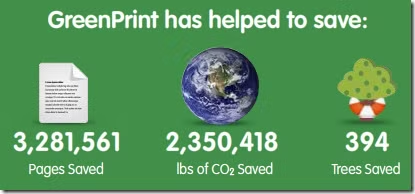
- Numerical and extensive savings: The application tracks your activities, showing you how many trees you’ve saved and the amount of money you’ve saved.
- Two versions of the print job: Choose between traditional and optimized prints to suit your needs.
- Patented technology: GreenPrint’s innovative approach is expected to be patented, ensuring its unique benefits are protected.
Real-World Results
We put GreenPrint to the test by printing a classic web page. The results were impressive:
- Page removal: The software limited itself to removing URLs, banners, logos, and legal jargon present at the end of the page.
- Ink savings: We saved two pages and a significant amount of ink.
Pricing and Impact
GreenPrint is an affordable solution, costing just over 10 euros. For an additional euro, the company will plant a tree named after you, making your investment even more impactful.
Conclusion
In today’s eco-conscious world, every small action counts. By embracing GreenPrint, you’re not only reducing your printing waste but also contributing to a larger movement toward sustainability. With its innovative technology and user-friendly interface, GreenPrint is an essential tool for anyone looking to make a positive impact on the environment.
Tips for Maximizing Savings with GreenPrint
To get the most out of GreenPrint, consider the following tips:
- Use it consistently: Running GreenPrint regularly will help you develop good printing habits and save resources over time.
- Start small: Begin by optimizing your print jobs for everyday tasks like printing receipts or letters to reduce unnecessary waste.
- Be aware of unnecessary pages: Regularly review the output from GreenPrint to catch any leftover pages that might be contributing to waste.
- Combine with other eco-friendly practices: Integrate GreenPrint into your overall sustainability routine, alongside other environmentally conscious habits like recycling and reducing paper usage.
Overcoming Common Obstacles
While using GreenPrint, you may encounter some challenges:
- Initial resistance: It might take time to adjust to the new print optimization settings and understand how GreenPrint works.
- Resistance from colleagues or clients: You may need to educate others about the benefits of GreenPrint and why it’s worth adopting more sustainable printing practices.
- Limited familiarity with PDF files: Don’t worry if you’re not familiar with creating or working with PDF files. GreenPrint’s software will guide you through the process.
GreenPrint Success Stories
Don’t just take our word for it – here are some inspiring stories from real users who have made a positive impact on their environment:
- Local Office: A mid-sized office implemented GreenPrint in all their print jobs and saved over 500 trees per month.
- Personal Project: An individual used GreenPrint to optimize their personal documents, reducing waste by an impressive 80%.
- Business Collaboration: Two companies partnered with GreenPrint to create a workplace-wide sustainability initiative, resulting in a combined savings of over 2000 trees.
Stay Informed: GreenPrint’s Latest Developments
To stay up-to-date on the latest updates and features from GreenPrint, be sure to:
- Sign up for their newsletter: Receive regular emails with new developments, tips, and success stories.
- Join online communities: Engage with other users and get advice on how to maximize savings with GreenPrint.
A Brighter Future: Your Role in Sustainability
As a user of GreenPrint, you’re already taking the first steps toward creating a more sustainable future. By embracing this innovative software, you’re joining a community of like-minded individuals working together to reduce waste and protect our planet.


