
Have you ever wondered how much energy your computer is wasting when it’s left on all night? According to a Microsoft survey, a whopping 70% of users leave their computers on during the night. This can lead to massive amounts of wasted electricity. But what if we told you there was a simple way to reduce this energy waste and save some money?
What is an Eco Button?
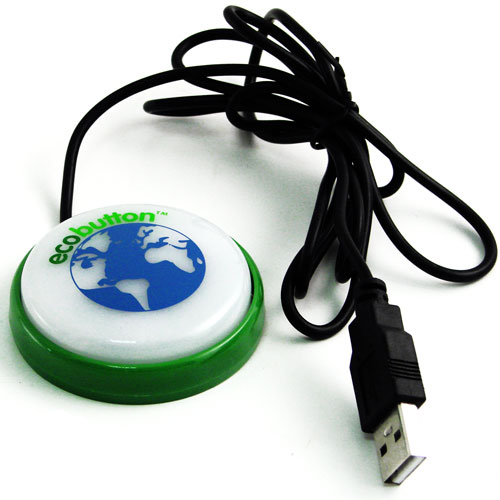
An eco button, also known as an “energy saver” or “power saving device,” is a small gadget that helps you conserve energy when using your computer. It’s essentially a button that you can press to put your computer into a low-power mode, reducing energy consumption and lowering your electricity bills.
How Does it Work?
The eco button connects to your computer via a USB port and works by setting up a series of parameters that optimize the computer’s performance while reducing power consumption. When you’re about to leave your computer on, all you need to do is press the eco button, and your computer will enter “ecomode,” which is a special mode designed to minimize energy waste.
What are the Benefits?
There are several benefits to using an eco button:
- Energy Savings: By reducing power consumption, you can lower your electricity bills and contribute to a more sustainable future.
- Cost-Effective: The eco button can help you save money on your energy bills, which can add up over time.
- Environmental Benefits: By reducing energy waste, you’re also helping to reduce greenhouse gas emissions and mitigate climate change.
How Much Does it Cost?
The eco button is a relatively affordable device, costing around 20 euros. This small investment can make a big difference in the long run, both for your wallet and for the environment.
What Can I Expect from My Eco Button?
When you use an eco button, you can expect:
- Energy Monitoring: The software that comes with the eco button will allow you to monitor your energy usage and see exactly how much energy you’re saving.
- Performance Optimization: The eco button’s optimization settings will ensure that your computer is running at peak performance while still being energy-efficient.
- Convenience: With an eco button, you’ll never have to worry about leaving your computer on by mistake again.
Common Misconceptions About Eco Buttons
There are several common misconceptions about eco buttons that we’d like to address:
- Q: Will using an eco button slow down my computer?
A: No, the eco button is designed to optimize performance while reducing power consumption. You won’t notice any slowdowns or impact on your computer’s speed. - Q: Can I use an eco button with all types of computers?
A: Most eco buttons are compatible with a wide range of computers, including laptops and desktops. However, it’s always best to check the manufacturer’s website for specific compatibility information before purchasing. - Q: Are eco buttons worth the investment?
A: Absolutely! Eco buttons can help you save money on your energy bills and contribute to a more sustainable future. The small upfront cost is well worth the benefits you’ll enjoy in the long run.
Tips for Getting the Most Out of Your Eco Button
Here are some tips for getting the most out of your eco button:
- Use it consistently: Make sure to use your eco button every time you leave your computer on overnight or when you’re not using it.
- Monitor your energy usage: Keep an eye on your energy usage and adjust your settings as needed to optimize performance and save energy.
- Combine with other energy-saving habits: Use your eco button in conjunction with other energy-saving habits, such as turning off unnecessary devices and using power strips.
Conclusion
The eco button is a simple yet effective way to save energy and reduce your carbon footprint. By investing in this small device, you can make a big difference in the long run. So why not give it a try? With an eco button, you’ll be clicking towards a more sustainable future in no time.
Frequently Asked Questions
- Q: How much energy can I save with an eco button?
A: The amount of energy you can save will depend on your usage patterns and the specific eco button model. However, on average, users have reported saving up to 20 euros per year. - Q: Is it difficult to set up the eco button?
A: No, setting up the eco button is a straightforward process that requires minimal technical expertise. - Q: Can I use an eco button with my laptop?
A: Yes, most eco buttons are compatible with laptops and can be easily connected via USB port. - Q: How often should I check my energy usage?
A: It’s recommended to check your energy usage regularly to ensure that the eco button is working effectively and to identify any areas where you can make further adjustments. - Q: Can I use an eco button with multiple devices?
A: Yes, many eco buttons are designed to work seamlessly with multiple devices, making it easy to monitor and optimize your energy usage across all your devices. - Q: Is the eco button compatible with all operating systems?
A: Most eco buttons are compatible with Windows and Mac operating systems. However, it’s always best to check the manufacturer’s website for specific compatibility information before purchasing. - Q: Can I return my eco button if it doesn’t work as expected?
A: Yes, most manufacturers offer a satisfaction guarantee or warranty on their eco buttons. If you’re not satisfied with your purchase, you can contact the manufacturer to arrange a return or replacement.


