
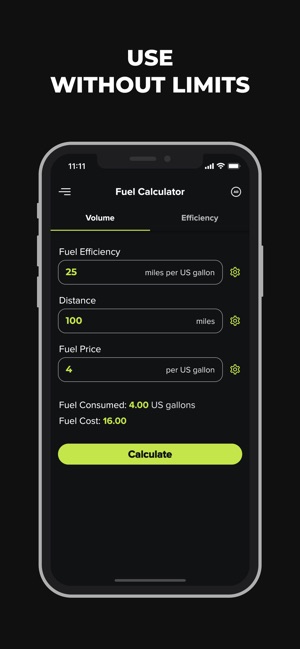
As a car owner, you’re probably curious about how much fuel your vehicle is consuming and the environmental impact of your daily driving habits. Well, we’ve got some good news for you – there’s an app that can help you track and optimize your fuel consumption, and it’s available on your iPhone!
What is EcoDrive?
EcoDrive is a free, Italian-language application designed specifically to calculate fuel consumption, CO2 emissions, expenses, and distance traveled. This utility app has received excellent reviews for its simplicity, effectiveness, and eco-friendliness.
Key Features of EcoDrive
- Calculates fuel consumption based on factors such as engine type (gasoline or diesel), current odometer reading, and fuel costs
- Provides detailed statistics and graphs to help you track your progress over time
- Allows you to set parameters for tire pressure to optimize fuel efficiency
Getting Started with EcoDrive
To begin using EcoDrive, follow these steps:
- Download the app: Search for “EcoDrive” in the App Store on your iPhone and download it.
- Set up your vehicle: Enter your vehicle’s make, model, and engine type (gasoline or diesel). If you’re not sure about this information, don’t worry – EcoDrive will guide you through the process.
- Add your current odometer reading: Enter your current mileage to start tracking your progress.
- Enter fuel costs: Add the cost of one liter of gasoline (or diesel) to track your expenses over time.
How EcoDrive Works
Once you’ve set up your vehicle and started tracking your data, EcoDrive will provide you with a range of useful features:
- Current consumption: View how much fuel is being consumed per kilometer.
- Total consumption: Track the total amount of fuel used since the last update.
- Estimated expenses: Calculate the estimated cost of fuel based on the current price and distance traveled.
Tips for Optimizing Fuel Efficiency
To get the most out of EcoDrive, consider these tips:
- Regularly check tire pressure: Low tire pressure can significantly decrease fuel efficiency. Set a reminder to check your tire pressure regularly.
- Maintain a consistent driving style: Aggressive driving habits can lower fuel efficiency. Drive smoothly and avoid sudden acceleration.
Advanced Features of EcoDrive
EcoDrive also offers several advanced features that can help you optimize your fuel consumption:
- Fuel-saving suggestions: Receive personalized recommendations for improving your fuel efficiency based on your driving habits.
- CO2 emissions tracking: Monitor your carbon footprint and make environmentally friendly choices.
- Vehicle maintenance reminders: Stay on top of routine maintenance tasks to ensure your vehicle runs smoothly.
Using EcoDrive with Other Apps
EcoDrive can be integrated with other apps to provide a more comprehensive picture of your fuel consumption:
- Google Maps integration: Use EcoDrive to track your route and calculate estimated fuel costs.
- Weather app integration: Stay informed about weather conditions that may impact your fuel efficiency.
Common Issues with EcoDrive
While EcoDrive is generally a reliable app, there are some common issues to be aware of:
- App crashes: Occasionally, the app may crash or freeze. Try restarting the app to resolve the issue.
- Data loss: In rare cases, data may become lost during syncing. Try reinstalling the app or contacting support.
Conclusion
EcoDrive is an excellent tool for car owners looking to optimize their fuel consumption and reduce their environmental impact. By tracking your data and setting parameters for tire pressure, you’ll be well on your way to becoming a more eco-friendly driver. So why not give EcoDrive a try today?
Frequently Asked Questions
1. Is EcoDrive available in languages other than Italian?
Yes! EcoDrive is available in multiple languages, including English.
2. Can I use EcoDrive for any type of vehicle?
EcoDrive is compatible with most vehicles, but please note that it may not work for all makes and models.
3. How do I reset my data if I need to reinstall the app?
To reset your data, simply uninstall the app, wait a few minutes, and then reinstall it. Your current data will be synced automatically.
4. Can EcoDrive be used with other types of fuel than gasoline or diesel?
EcoDrive is designed for use with gasoline and diesel fuels only. If you have an alternative fuel type, please consult the manufacturer’s guidelines for compatibility.
5. Is EcoDrive free to download and use?
Yes! EcoDrive is a completely free app, with no hidden costs or advertisements.
EcoDrive allows you to share your data with friends and family, but be aware that this feature may not be compatible with all devices.
7. Is EcoDrive compatible with iOS 4.2 or later versions?
Yes! EcoDrive is designed for use with iOS 4.2 or later versions.
8. How can I contact the developers of EcoDrive if I have any issues or questions?
You can reach out to the EcoDrive team through their support page, where you’ll find answers to common questions and resources for troubleshooting.
Additional Tips
Here are some additional tips to get the most out of EcoDrive:
- Regularly review your data: Take a few minutes each week to review your fuel consumption statistics and identify areas for improvement.
- Set realistic goals: Set achievable targets for reducing your fuel consumption, such as decreasing your daily mileage or improving your fuel efficiency.
- Stay engaged with the EcoDrive community: Join online forums or social media groups to connect with other users, share tips, and stay up-to-date on new features.
Final Thoughts
EcoDrive is a powerful tool for optimizing fuel consumption and reducing environmental impact. By understanding how it works and using its advanced features effectively, you can make a positive difference in your daily driving habits. So why not give EcoDrive a try today?


