As a seasoned runner and mental coach, I embarked on an exciting journey to improve my performance using the Garmin Coach program. In this article, I’ll share my experience, insights, and tips for utilizing Garmin Coach to achieve your running goals.
What is Garmin Coach?
Garmin Coach is a free training program available exclusively for Garmin watch users. It provides personalized coaching and adaptive workouts designed by experienced coaches like Greg McMillan. The program helps you set and achieve specific running objectives on various distances, including 5K, 10K, and half-marathons.
Getting Started with Garmin Coach
To access Garmin Coach, follow these steps:
- Ensure your watch is a compatible device.
- Download the Garmin Connect app and log in to your account.
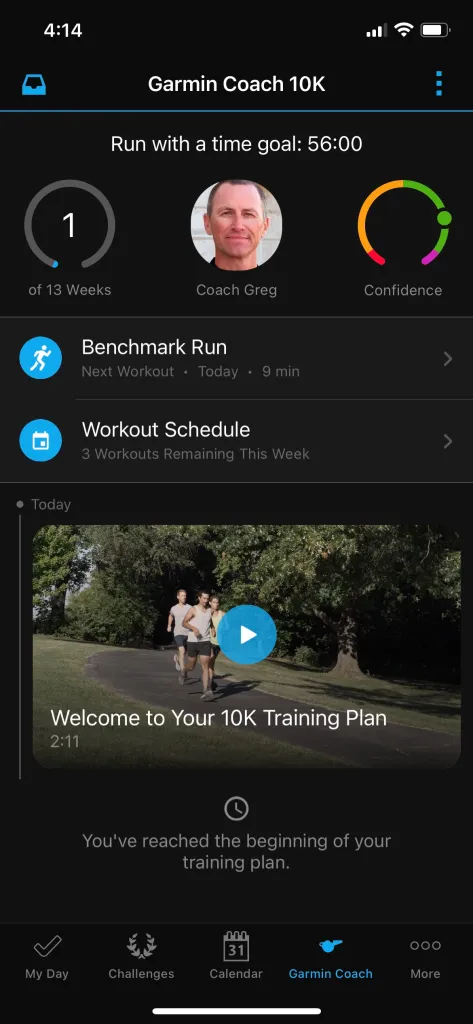
- Access the “Garmin Coach” section within the app.
- Choose from three coaching programs: 5K, 10K, or Half-Marathon.
Compatible Devices
To use Garmin Coach, you’ll need a compatible device. Some popular options include:
- Garmin Forerunner series
- Garmin Fenix series
- Garmin Vivoactive series
Using Garmin Coach
Here’s how to get the most out of Garmin Coach:
- Choose your coaching program and set specific objectives.
- Complete daily workouts, including dynamic warm-ups and cool-downs.
- Monitor your progress with real-time feedback on your watch.
- Access video tutorials and articles on running technique and other related topics.
My Experience with Garmin Coach
I joined the Garmin Coach program led by coach Greg McMillan to improve my 5K performance. I set a goal of beating my previous personal best (PB) time, which was 22:09 minutes. The coaching program consisted of 11 weeks of structured workouts, including daily sessions and optional strength training exercises.
The Journey Begins
Before starting the program, I provided essential information, such as my age, sex, number of workouts per week, and preferred running days. This data helped the coach create a personalized plan tailored to my needs. The coaching program included video welcome messages from Coach Greg, who provided motivational support throughout the journey.
Weekly Progression
Each week, I received a new workout plan with specific goals and objectives. I had access to real-time feedback on my progress, including metrics such as pace, distance, and heart rate. The program also offered optional strength training exercises to enhance my performance.
Challenges and Triumphs
During the 11-week journey, I encountered some challenges:
- Difficulty maintaining a consistent pace during workouts
- Tendency to overexert myself during longer runs
- Struggling with self-doubt and uncertainty
However, I also experienced significant successes:
- Improved performance metrics
- Increased confidence in my abilities
- Enhanced mental toughness and resilience
The Big Day: My 5K PB Attempt
After completing the coaching program, I was ready to tackle my goal of beating my previous 5K PB time. The conditions were perfect – sunny weather with a temperature of 10-15°C. I had support from friends, including Matteo Sala and Massimiliano Sangalli, who cheered me on throughout the run.
The Results: A New Personal Best
I crossed the finish line in an impressive 21:47 minutes, securing a new personal best! This achievement was not only exhilarating but also a testament to the effectiveness of Garmin Coach and Coach Greg’s guidance.
Lessons Learned
Throughout my experience with Garmin Coach, I learned valuable lessons about:
- The importance of consistency and patience
- How to set realistic goals and track progress
- The benefits of working with a coach and receiving personalized feedback
I hope this article has inspired you to try Garmin Coach for yourself. Remember to be patient, stay focused, and trust the process.
Tips for Maximizing Your Garmin Coach Experience
- Set Realistic Goals: Set specific, achievable goals that align with your running aspirations.
- Create a Training Schedule: Plan out your workouts in advance and stick to your schedule as closely as possible.
- Listen to Your Body: Rest when needed, and don’t push yourself too hard – it’s essential for recovery and injury prevention.
- Stay Hydrated and Fueled: Proper nutrition and hydration are crucial for optimal performance during training sessions.
- Use Garmin Connect to Track Progress: Regularly review your progress on Garmin Connect to monitor your improvement.
FAQs
- What is Garmin Coach?
Garmin Coach is a free training program available exclusively for Garmin watch users. It provides personalized coaching and adaptive workouts designed by experienced coaches like Greg McMillan. - How do I access Garmin Coach?
To access Garmin Coach, download the Garmin Connect app and log in to your account. Then, navigate to the “Garmin Coach” section within the app. - What are the compatible devices for Garmin Coach?
Some popular options include Garmin Forerunner series, Garmin Fenix series, and Garmin Vivoactive series. - How long does it take to see results with Garmin Coach?
Results can vary depending on individual factors such as fitness level and consistency of training. However, most users report noticeable improvements within 6-12 weeks. - Can I customize my coaching program?
Yes, you can adjust your coaching program to suit your specific needs and goals. Simply log in to Garmin Connect and access the “Garmin Coach” section to make changes.
Conclusion
My experience with Garmin Coach has been incredibly rewarding, and I’m confident that it can help you achieve your running goals as well. By understanding how Garmin Coach works, setting realistic objectives, and staying committed to your training schedule, you’ll be on your way to unlocking your full potential. Remember to stay patient, stay focused, and trust the process – the results will speak for themselves.
Additional Resources
For those interested in learning more about Garmin Coach or want to get started with the program, here are some additional resources:
- Garmin Connect App: Download the app from the Apple App Store or Google Play Store to access Garmin Coach.
- Garmin Coach Website: Visit the official Garmin Coach website for more information and FAQs.
- Greg McMillan’s Coaching Tips: Check out Coach Greg McMillan’s blog for expert tips on running technique, training strategies, and mental preparation.
By incorporating Garmin Coach into your training regimen, you’ll be taking a significant step towards achieving your running goals. Remember to stay committed, patient, and focused, and the results will speak for themselves. Happy training!