
As we spend more time working at our desks, it’s essential to prioritize our posture to avoid discomfort, prevent injuries, and maintain overall well-being. In this article, we’ll delve into the importance of correct desk posture, provide tips on how to achieve it, and discuss common mistakes that can lead to problems.
Why Good Posture Matters
Maintaining good posture at your desk is crucial for several reasons:
- Prevents Back Pain: Poor posture can put strain on your back muscles, leading to pain and discomfort. This can be particularly problematic if left untreated, as it can escalate into more severe conditions like herniated discs or sciatica.
- Reduces Muscle Fatigue: Good posture helps distribute the weight evenly, reducing muscle fatigue and stress. When you’re standing or sitting in a way that’s not aligned with your body’s natural structure, your muscles work harder to compensate, leading to fatigue and discomfort.
- Improves Breathing: Proper breathing is essential for overall health. Good posture allows you to breathe more efficiently, which can help reduce stress and promote relaxation.
Setting Up Your Workspace
To achieve good posture, it’s essential to set up your workspace correctly. Here are some tips:
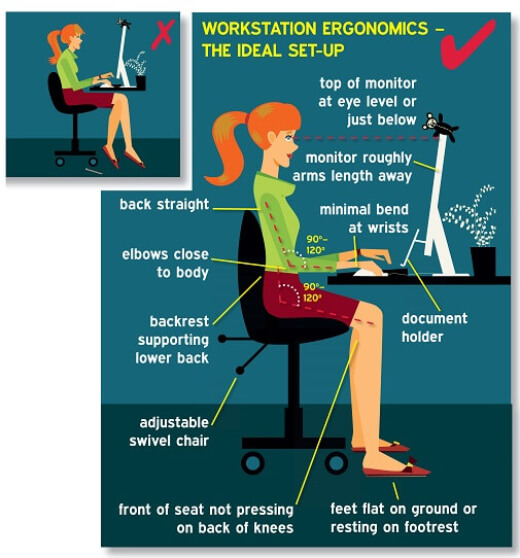
- Ergonomic Chair: Invest in an ergonomic chair that provides proper lumbar support and maintains the natural curve of your spine. Look for a chair with adjustable height and armrests.
- Adjustable Desk: Consider using an adjustable desk that allows you to switch between sitting and standing throughout the day. This can help reduce muscle fatigue and promote better posture.
- Monitor Placement: Place your monitor directly in front of you, at a distance of about 20-25 inches, and at a height that allows you to gaze slightly downward (around 35° to 60°). This will help prevent strain on your neck and shoulders.
- Keyboard and Mouse: Position your keyboard and mouse close to your body, with your wrists straight and your elbows at a 90-degree angle. Avoid bending or reaching forward, as this can lead to discomfort and injury.
Common Mistakes to Avoid
Here are some common mistakes to avoid when setting up your workspace:
- Forgetting to Adjust the Monitor Height: Failing to adjust the monitor height can lead to neck strain and discomfort. Make sure to position your monitor at a comfortable distance and height that allows you to gaze slightly downward.
- Not Using an Ergonomic Chair: Using a chair that doesn’t provide proper lumbar support can lead to back pain and muscle fatigue. Look for a chair with adjustable height and armrests, and consider consulting with a healthcare professional or ergonomics specialist for personalized recommendations.
- Ignoring Foot Health: Poor foot health can contribute to discomfort and injury when working at your desk. Make sure to wear comfortable shoes or socks, and take regular breaks to stretch your feet.
Additional Tips for Maintaining Good Posture
Here are some additional tips to help you maintain good posture:
- Take Breaks: Take regular breaks to stand up, stretch, and move around. This can help reduce muscle fatigue and promote better posture.
- Exercise Regularly: Engage in regular exercise to improve your overall flexibility and strength. This can help reduce muscle tension and promote better posture.
- Practice Mindfulness: Practice mindfulness techniques, such as deep breathing and meditation, to reduce stress and promote relaxation. When you’re feeling stressed or anxious, it’s common to hunch over or slouch, which can lead to discomfort and injury.
Conclusion
Maintaining good posture at your desk is essential for preventing discomfort, reducing injuries, and promoting overall well-being. By setting up your workspace correctly, avoiding common mistakes, and practicing good posture habits, you can enjoy a healthier, happier working life.
Frequently Asked Questions
Here are some frequently asked questions related to desk posture:
- How often should I take breaks?
Taking regular breaks is essential for maintaining good posture. Aim for at least 10-15 minute breaks every hour. - What is the best way to adjust my monitor height?
To adjust your monitor height, place it directly in front of you and at a distance of about 20-25 inches. The top of the screen should be level with your eyes or slightly below. - Can I use a standing desk all day?
While standing desks can be beneficial for maintaining good posture, they may not be suitable for everyone. Consider alternating between sitting and standing throughout the day to avoid fatigue and discomfort. - How can I reduce muscle fatigue when working at my desk?
To reduce muscle fatigue, take regular breaks, exercise regularly, and practice mindfulness techniques.
Additional Resources
Here are some additional resources that may be helpful for maintaining good posture:
- Ergonomic Guidelines: The Occupational Safety and Health Administration (OSHA) provides guidelines for ergonomic workstations, including tips for setting up your workspace correctly.
- Posture Exercises: There are many exercises you can do to improve your posture, such as shoulder rolls, neck stretches, and core strengthening exercises. Consult with a healthcare professional or fitness expert for personalized recommendations.
- Ergonomic Products: Consider investing in ergonomic products, such as ergonomic chairs, standing desks, and mousepads, that can help promote better posture.
By following the tips outlined in this article and incorporating them into your daily routine, you can enjoy a healthier, happier working life.


