
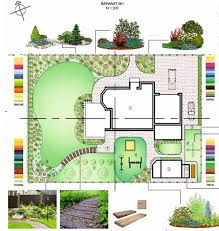
As a gardener, there’s nothing quite like envisioning your dream garden. With the right tools, you can bring your ideas to life and create a beautiful outdoor space that reflects your personal style. In this article, we’ll explore the world of gardening design software, discussing its benefits, types, and top picks.
What is Gardening Design Software?
Gardening design software allows you to create detailed designs for gardens, green spaces, and other outdoor structures. These programs can be used online or offline and often come with features like 3D simulations, video renderings, and customization options.
In the past few years, gardening design software has evolved significantly, offering more intuitive interfaces, user-friendly tools, and advanced features that cater to both beginners and professionals alike.
Types of Gardening Design Software
There are many types of gardening design software available, catering to different needs and skill levels. Some popular options include:
- Professional software: Paid programs used by architects, landscape designers, and agronomists for creating high-end designs with intricate details.
- Amateur-friendly software: Less expensive or free programs suitable for DIY gardeners who want to create simple designs.
Google Sketchup: A Popular Choice
Google Sketchup is one of the most well-known gardening design software. It allows users to work in 3D space with a 360-degree view and offers standard views by inserting open-source models of plants and objects.
While it may require learning various commands, Google Sketchup’s free version or paid PRO version makes it accessible to both beginners and experienced users.
Free Gardening Design Software
For those on a budget or looking for a hassle-free experience, there are many free gardening design software options available. Some popular choices include:
- Marshall’s Garden Visualizer: A simple online tool suitable for designing patios and working in 3D.
- NBL Landscape: An Italian software offering high-quality 3D graphics, animations, and customizable planimetries.
Online Gardening Design Software
Two free on-line gardening design software options are:
- GardenPuzzle: Allows users to draw gardens and green spaces online, create various views, and add elements like flowers, houses, and gazebos.
- My Garden: A user-friendly tool suitable for designing gardens as well as irrigation systems.
Best Gardening Design Software
For those looking for a professional-grade software, consider:
- Vectorworks Landmark: One of the most popular software used for urban planning and territorial landscaping plans.
- Yates: A free software that allows users to design a virtual garden and access a vast catalog of trees and plants.
What Are the Benefits of Gardening Design Software?
Gardening design software offers numerous benefits, including:
- Visual representation: Creates a visual representation of your outdoor space, allowing you to see how different elements will work together.
- Cost savings: Helps you plan and budget for your project, reducing costs associated with changes or revisions later on.
- Time-saving: Saves time by automating tasks like measuring distances and calculating plant placement.
- Increased accuracy: Provides precise measurements and calculations, ensuring accuracy in your design.
How to Get Started with Gardening Design Software
Getting started with gardening design software is relatively easy. Here are some steps to follow:
- Choose a software: Research different options and choose one that suits your needs.
- Watch tutorials: Watch online tutorials or instructional videos to learn the basics of the software.
- Practice: Start practicing with simple designs before moving on to more complex projects.
- Join a community: Join online communities or forums to connect with other users and get help when needed.
Common Mistakes to Avoid
When using gardening design software, there are some common mistakes to avoid:
- Overcomplicating the design: Keep your designs simple and focused on the essential elements.
- Not considering scale: Make sure your design takes into account the scale of different features.
- Not accounting for sunlight: Consider how sunlight will affect your design, including areas that need shade or full sun.
Best Practices
To get the most out of gardening design software, follow these best practices:
- Use high-quality images: Use high-resolution images to ensure accuracy in your design.
- Measure accurately: Double-check measurements and calculations for accuracy.
- Collaborate with others: Share your designs with others to get feedback and improve your work.
Gardening Design Software for Specific Needs
Different gardening design software options cater to specific needs, such as:
- Garden visualization: Used for designing and visualizing gardens.
- Irrigation system planning: Used for creating detailed irrigation systems.
- Landscape design: Used for creating comprehensive landscape designs.
Challenges and Limitations
While gardening design software offers many benefits, there are also challenges and limitations to consider:
- Steep learning curve: Some software options can be complex, requiring a significant amount of time and effort to learn.
- Limited availability: Not all software options may be available for purchase or download.
Conclusion
Gardening design software is an essential tool for creating beautiful and functional outdoor spaces. With its numerous benefits, types, and top picks, it’s easy to find the perfect software for your needs. Whether you’re a seasoned gardener or just starting out, gardening design software can help you bring your ideas to life.
Frequently Asked Questions
- Q: What is the best gardening design software for beginners?
A: For beginners, we recommend starting with free or low-cost options like GardenPuzzle or Yates. - Q: Can I use gardening design software to create a realistic project?
A: Yes, many software options offer 3D simulations and video renderings that can help you create a highly realistic project. - Q: How much does professional gardening design software cost?
A: Professional-grade software can range from $100 to $1,000 or more, depending on the specific program and features. - Q: Can I use online gardening design software for large-scale projects?
A: Yes, some online software options like Vectorworks Landmark are designed for large-scale projects and offer high-quality 2D and 3D graphics. - Q: How do I get started with gardening design software?
A: Start by exploring different software options and watching tutorials to learn the basics.


