
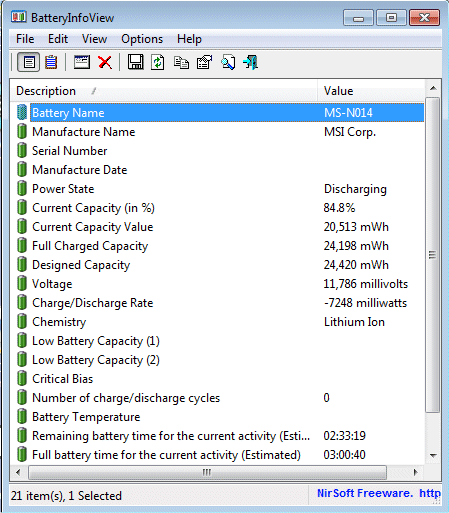
As a laptop user, you’re likely aware of the importance of battery life. Whether you’re using your laptop for work, school, or entertainment, it’s essential to get the most out of your device’s battery. In this article, we’ll explore some free software that can help you optimize your laptop’s battery life and increase its overall performance.
What is Battery Life Optimization?
Battery life optimization refers to the process of reducing energy consumption while maintaining optimal system performance. By optimizing battery life, you can:
- Increase your laptop’s runtime
- Reduce power consumption
- Extend the lifespan of your battery
Free Software for Laptop Battery Life Optimization
Fortunately, there are several free software options available that can help you optimize your laptop’s battery life. Here are some popular ones:
1. Boray Power
Boray Power is a lightweight software that helps reduce energy consumption by slowing down the processor when the laptop is not in use. This feature prevents unnecessary power consumption and prolongs your battery life.
- Version: Trial version available, no limitations
- Compatibility: Windows 10/8/7/Vista/XP
- Key features:
- Reduces energy consumption by slowing down the processor
- Prevents fastidiosly slow performance when not in use
2. Verdiem
Verdiem is a more comprehensive software that helps you manage your laptop’s battery life. Developed by Edison, a leading energy solutions company, Verdiem offers advanced features to optimize battery performance.
- Version: Free version available
- Compatibility: Windows 10/8/7/Vista/XP
- Key features:
- Battery management and optimization
- Energy consumption monitoring
- Advanced power-saving features
3. AKS-Labs
AKS-Labs is a free software designed for users of Windows 9x, 2000, XP, and NT. This software helps optimize energy consumption by activating standby mode for the monitor when not in use.
- Version: Free version available
- Compatibility: Windows 9x, 2000, XP, and NT
- Key features:
- Optimizes energy consumption by activating standby mode
- Automatic power-saving
- Wattage monitoring
4. Jsutils
Jsutils is a free software that helps optimize energy consumption on Windows systems. This software monitors mouse, keyboard, and CPU activity to reduce unnecessary power consumption.
- Version: Free version available
- Compatibility: Windows 10/8/7/Vista/XP
- Key features:
- Optimizes energy consumption by monitoring device activity
- Automatic power-saving
- Wattage monitoring
5. Granola
Granola is a free software that helps optimize laptop battery life by increasing autonomy. This software offers both free and paid versions.
- Version: Free version available
- Compatibility: Windows and Linux
- Key features:
- Increases laptop autonomy
- Optimizes energy consumption
- Advanced power-saving features
Other Options for Laptop Battery Life Optimization
While the above software options are highly effective, there are other ways to optimize your laptop’s battery life.
- Power Manager Sonar: This freeware automatically shuts down your computer when not in use.
- WinOFF: This freeware automatically turns off your computer after a set period of inactivity.
- System settings: Most operating systems offer built-in power-saving features that can be accessed through system settings.
Tips and Tricks for Optimizing Laptop Battery Life
Here are some additional tips to help you optimize your laptop’s battery life:
- Adjust your display settings: Lowering the brightness of your screen can significantly improve your laptop’s battery life.
- Use power-saving features: Most operating systems offer power-saving features that can be enabled to reduce energy consumption.
- Avoid overheating: Make sure your laptop is in a well-ventilated area and keep it clean to prevent overheating, which can damage your battery.
- Update your drivers: Outdated drivers can cause your laptop’s battery life to decrease. Ensure that all drivers are up-to-date.
Conclusion
Optimizing your laptop’s battery life is crucial for extending its runtime and reducing power consumption. With the help of these free software options, you can optimize your laptop’s energy efficiency and get the most out of your device’s battery.
Frequently Asked Questions (FAQs)
- What is the best way to optimize my laptop’s battery life?
- The best way to optimize your laptop’s battery life is by using a combination of free software options, such as Boray Power and Verdiem, and adjusting system settings to reduce power consumption.
- Can I use these free software options on Macs?
- Yes, some of the software options mentioned can be used on Macs. However, the best results may require manual adjustments to system settings and configuration.
- Will these free software options harm my laptop’s performance?
- No, most of these free software options are designed to optimize energy efficiency without compromising system performance.
- Can I use these free software options on multiple devices?
- Yes, some of the software options mentioned can be used across multiple devices.
- How do I reset my laptop’s battery life after using these free software options?
- To reset your laptop’s battery life, simply uninstall any installed software and restart your device.
By optimizing your laptop’s battery life with these free software options, you can extend its runtime, reduce power consumption, and enjoy a more efficient computing experience.


